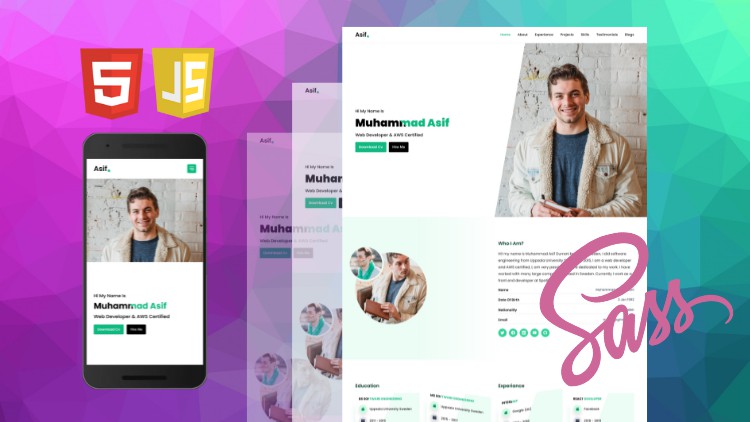
Sass Complete Guide, Create Responsive Portfolio Website

- Description
- Curriculum
- FAQ
- Reviews
Do you want to supercharge your CSS skills?
If yes? then welcome to “HTML, Sass & JavaScript Create Responsive Portfolio Website“, In this course, you will learn modern Sass or Scss. In This course will not learn only Sass you will also learn CSS Flexbox from scratch step by step, the only thing you just need the basic knowledge of HTML and CSS. Now, what you will learn?
You will learn
-
CSS Flexbox from scratch
-
Sass features from scratch
-
Sass modern features (@use, @forward)
-
CSS responsive grid system same like bootstrap (col-xlg, col-lg, col-md, col-sm, col-xsm)
-
Fancy looking UI
-
JavaScript with toggle menu and modal
After completing this course you will be able to create responsive modern-looking websites with HTLM, Flexbox, and Sass. Most importantly you will learn how to create a responsive grid system same as Bootstrap responsive grid system, and that’s my favorite section in this course. In this course you will not learn only the code, you will also learn how to create a professional developer portfolio website, and you can see the website demo in the promo video. Now if you are ready just enroll in the course and will be happy after taking this course, so why do you wait?
Fast support!
-
I reply to each student (If you are stuck just message me or post your issue in the Q/A section)
-
quick response

-
4
 Section Intro
In this video, I will give you an overview of this section, that what we will learn in this section.
-
5
What is Flexbox?
In this video, we will learn what is flexbox actually? flex is a layout module, with the help of flexbox we can align items very easily vertically or horizontaly.
-
6
Flex Container & Flex Items
In this video, we are going to talk about what is flex container and what are flex items, flex container is a row class or parent element and flex items are child classes or child columns.
-
7
Flex Direction
In this video, we will talk about flex-direction property, flex-direction property basically change the flex-direction.
-
8
Flex Basis
In this video, we are going to flex-basis property, the flex-basis property we can use instead CSS width property.
-
9
Flex Grow
In this video, we are going to talk about flex-grow property, flex-grow means if we have free space in a row then flex-grow will distribute the space between columns.
-
10
Flex Shrink
In this video, we will talk about flex-shrink property, flex-shrink property is the opposite of flex-grow property, it shrink flex items.
-
11
Flex Property
In this video, we will talk about the flex property, flex property basically combine three properties in a single line all of them are flex-grow, flex-shrink and flex-basis.
-
12
Order Property
In this video, we are going to talk about flexbox order property, we the help of order property we can change the order of flex items.
-
13
Flex Wrap Property
In this video, we are going to talk about flex-wrap property, flex-wrap property move items into the next row if we don't have any free available space in a row.
-
14
Justify Content
In this video, we are going to align items horizontally and to align items horizontally we have to use the justify-content property.
-
15
Align Items
In this video, we are going to align items vertically, and to align items vertically we have to use align-items property.
-
16
Section Intro
In this video, I will give an overview of this section, that, what we will learn in this section.
-
17
What is Sass ?
In this video, we are going to learn what is sass and what are the main features of sass.
-
18
Create New Folder Structure
In this video, we are going to create a new folder for sass inside there we will do the sass code.
-
19
Install Sass Package
In this video, we are going to install the sass package which will compile our sass or scss code to pure CSS.
-
20
Run Sass Script From Package.json File
In this video, we are going to run the Sass script from the pacakage.json file.
-
21
What are Sass Variables ?
In this video, we are going to talk about sass or scss variables, variables are containers that store values in the computer memory.
-
22
Sass @debug Rule
In this video, we are going to talk about @debug rule using debug rule we can debug any sass variables value or expression results.
-
23
Sass Modules
In this video, we are going to talk about sass modules, with the help of sass modules we can divide our code into different modules.
-
24
Sass vs Scss
In this video, we are going to talk about what is the basic difference between Sass and Scss.
-
25
Access Sass Variables in Sass Modules
In this video, we are going to access Sass variables in Sass modules with the help of the @use rule.
-
26
Sass Nesting
In this video, we are going to talk about Sass nesting, nesting means we can nest children inside the parent class.
-
27
BEM Methodology
In this video, we are going to talk about BEM methodology, BEM stands for Block Element Modifiers, with the help of the BEM methodology we can create clear relation between parent and child classes.
-
28
Sass Lists
In this video, we are going we are going to talk about sass lists, in lists we can keep more than one values same as JavaScript arrays.
-
29
Sass Maps
In this video, we are going to talk about Sass maps, maps that keep data in key-value pairs same as JavaScript arrays.
-
30
Sass For Loop
In this video, we are going to talk about Sass for loop, for example, if you want to run a loop up to a specific point in that case you can use for loop.
-
31
IF Else Statements
In this video, we are going to talk about sass If Else statements, with the help of Else Statements we can check different conditions.
-
32
Sass Functions
In this video, we are going to talk about sass functions, that how to use functions in sass, in functions we can put some peace of logic and after we can reuse that function in deffenret places.
-
33
Sass Extends
In this video, we are going to talk about sass extends, with the help of sass extends we can reuse the CSS classes.
-
34
Sass Mixins
In this video, we are going to talk about sass mixins, Mixins and Extends both are the same things but Mixin functions accept parameters.
-
35
Section Intro
In this video, I will give you an overview of this section.
-
36
Create Project Folder
In this video, we are going to create a project folder and we will also install the Sass package locally in our project.
-
37
Create Files and Create Sass Script
In this video, we are going to create three files, first, we will create index.html second we will create an app.scss, and third we will create app.css and finally, we will create a script for sass.
-
38
Choose Font Family
In this video, we are going to choose google font for our website, in this course I will use Poppins font.
-
39
Set Default Line Height
In this video, we are going to set the default line height, line-height means space between inline elements.
-
40
Default Font Size
In this video, we are going to set the default font size.
-
41
Convert Pixel to Percentage in HTML Selector
In this video, we are going to convert pixel to percentage value because pixel creates some issues in the root element.
-
42
Reset Default Margin & Padding
In this video, we are going to reset the default padding and margin because all HTML tags have some default padding and margin.
-
43
Add Favicon
In this video, we are going to create a favicon and for that, we will use the third part website.
-
44
Setup Colors
In this video, we are going to set up colors and we will have different colors and all of them will store in variables.
-
45
Navbar Demo
In this video, I will give you an overview of the navigation will we will build in this section.
-
46
Navbar HTML Code
In this video, we are going to create the HTML code for navbar.
-
47
Style Navbar
In this video, we are going to style the navigation bar using Scss.
-
48
Style Links
In this video, we are going to style the navigation links.
-
49
Style Logo
In this video, we are going to style the logo.
-
50
Create Mixins
In this video, we are going to create mixins for code reuse ability.
-
51
Let's Implement @forward rule
In this video, we are going to implement the sass @forward rule with the help of the @forward rule we can combine many sass modules in a single place and from there we can access sass modules
-
52
Navbar Wrapper Padding
In this video, we are going to assign padding-left and padding-right to the navbar wrapper.
-
53
Responsive Grid Demo
In this video, I will give you an overview of the final responsive navbar so you will see that what will build in this section.
-
54
Create Container Class
In this video, we are going to create a container class that will wrap all our website all contents.
-
55
What Are Rows & Columns
In this video, we are going to talk about rows and columns.
-
56
What Are Media Queries
In this video, we are going to talk about CSS media queries, what are media queries and how they work?
-
57
Create Columns For Extra Large Screens (Extra Large Desktop & Laptop)
In this video, we are going to create columns for extra-large columns, extra-large columns will run only on extra large screens.
-
58
Use Extra Large Columns in HTML
In this video, we are going to use extra-large columns in the HTML file.
-
59
Create Columns For Large Screens (Large Desktops & Laptop)
In this video, we are going to create columns for large screens.
-
60
Create Columns For Medium Screens (Small Laptops & Large Tablets)
In this video, we are going to create columns for medium screens.
-
61
Create Columns For Small & Extra Small Screens (Tablets & Mobile Phones)
In this video, we are going to create columns for small screens and extra small screens.
-
62
Create Map For Breakpoints
In this video, we are going to create a map for breakpoints and after we will loop that map
-
63
Loop Breakpoints Map
In this video, we are going to loop the breakpoints map.
-
64
Refactor Loop
In this video, we are going to refactor the each loop because in each loop we have for loop two times.
-
65
Responsive Navbar Demo
In this video, I will give you an overview of this section that what we will build in this section actually.
-
66
Nest Media Query in CSS Class
In this video, we are going to learn about how to nest media query in css classes.
-
67
Create Mixin For Media Queries
In this video, we are going to create a mixin for media queries and we will reuse that mixin throughout all scss files.
-
68
Make Navbar Responsive on Mobile Screen
In this video, we are going to make the navbar responsive on mobile screens.
-
69
Style Navbar Links on Mobile Screen
In this video, we are going to style the navbar links on mobile screens.
-
70
Toggle Icon
In this video, we are going to add a toggle icon on the right side of the navbar.
-
71
Click Event Listener
In this video, we are going to add click on the event on the toggle icon if some click on toggle icon then we will toggle a class.
-
72
Toggle Class
In this video, we are going to toggle the CSS class as we click on the toggle icon.
-
73
Navbar Transitions
In this video, we are going to add transitions to the navbar at the time of opening and closing.
-
74
Header Demo
In this video, I will give you an overview about the hero section that what we will build in this section.
-
75
HTML Code for Header
In this video, we are going to do the html code for header section.
-
76
Style Header Headings
In this video, we are going to style the heading section.
-
77
Style Buttons
In this video, we are going to style the buttons.
-
78
Name Typewrite Effect
In this video, we are going to apply to typewrite effect on the name heading.
-
79
Header Image
In this video, we are going to add the header or hero image.
-
80
Make Header More Stylish
In this video, we are going to make the header image more stylish.
-
81
Make Header Responsive
In this video, we are going to make the header section responsive.
-
82
Responsive Buttons
In this video, we are going to make the buttons responsive.
-
83
Center Contents on Medium Screen
In this video, we are going to bring header contents to the center on the medium screen.
-
84
Modal Demo
In this video, I will give you an overview of modal which we will build in this section.
-
85
Modal HTML Code
In this video, we are going to do the modal HTML code.
-
86
Style Modal
In this video, we are going to style the modal which we have had created in the previous video.
-
87
Modal Close Icon
In this video, we are going to add close icon in the modal.
-
88
Make Modal Responsive
In this video, we are going to make the modal responsive on all screens.
-
89
Open and Close Modal
In this video, we are going to open and close the modal through JavaScript.
-
90
Animate Modal
In this video, we are going to animate the modal using css.