Modeling Fundamentals in Maya 2020

- Description
- Curriculum
- FAQ
- Reviews
Welcome to…
MODELING FUNDAMENTALS IN MAYA 2020
This epic course is over 14 hours long and takes you through the journey of mastering Maya’s powerful modeling tools.
You will learn HOW to use the tools, WHEN to use them and WHY you use them.
You will learn where the tools are located and how to use shortcuts for quick use.
You will learn professional modeling tips and tricks.
Modeling tools you will learn include:
-
Bevel Tool
-
Extrude Tool
-
Multi-Cut Tool
-
Insert Edge Loop Tool
-
Bridge Tool
-
Mirror Tool
-
Merge Tool
-
Booleans Tool
And many, many more.
Learning how to use a combination of these tools will make you proficient in modeling.
This course is project-based, so roll up your sleeves and get ready to dig in!
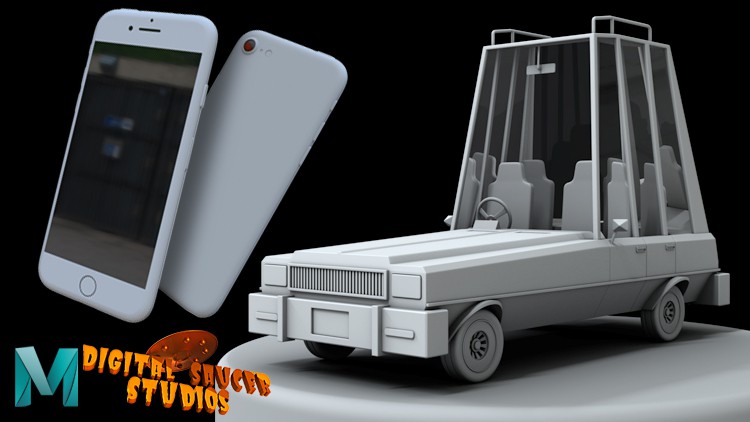
Firstly, you will learn how to model an iPhone.
You will learn every step of the modeling process.
You will learn how to create the basic shape of the phone with a cube, and from there, bevel the edges to make the corners of the phone rounded like a phone in real life.
From that point, you will learn how to model the buttons, the screen, the camera, and the port.
You will learn efficient modeling techniques as you go along and gain experience in the modeling process.
Finally, you will learn how to add proper shaders to the phone, like how to add glass to the phone screen, so the screen will reflect in the light just like in real life.
You will learn how to use lights in Maya so you can illuminate the phone, and how to render the phone so it will look realistic.
Then in the second half of the course, you will learn how to model a cartoon style car.
You will begin by blocking out the roof, then the chassis, then proceed to model the hood, the grill, the lights, the wheels, how to make the rims and the tire treads.
You will finally add details to the car, like the wing mirror, the steering wheel, the seats, the door handles, and also create the glass shader for the windows.
You will learn the difference between bad and good geometry and how to fix problems so your models have proper edge flows and clean geometry.
You will learn how to deal with common problems a lot of modelers make, and how to overcome these problems by using different modeling methods.
Finally, by the end of this course, you will have the confidence to make your own models inside Maya.
This course is designed for students who are serious about modeling and want to become a professional modeler.
Godspeed!
-
3
 Setting Up the Scene
 -
4
Bevelling the Edges of the Model
-
5
Creating More Bevels
-
6
Creating the First Button
-
7
Creating the Second Button
-
8
Creating the Rest of the Buttons
-
9
Creating the Screen
-
10
Creating Resolution for the Rectangular Cut-Out
-
11
Creating a Boolean Operation & Extruding the Rectangular Cut-Out
-
12
Cleaning Up the Cut-Outs
-
13
Creating the Bottom Button
-
14
Cleaning Up the Geometry Around the Screen
-
15
Creating the USB Port
-
16
Creating Holes and Details to the Port
-
17
Creating the First Top Button
-
18
Creating the Other Top Buttons
-
19
Creating the Final Hole in the Front
-
20
Creating the Back Buttons
-
21
Grouping the Phone
-
22
Rendering the Phone Part 1
-
23
Rendering the Phone Part 2
-
24
Using the Wireframe Shader