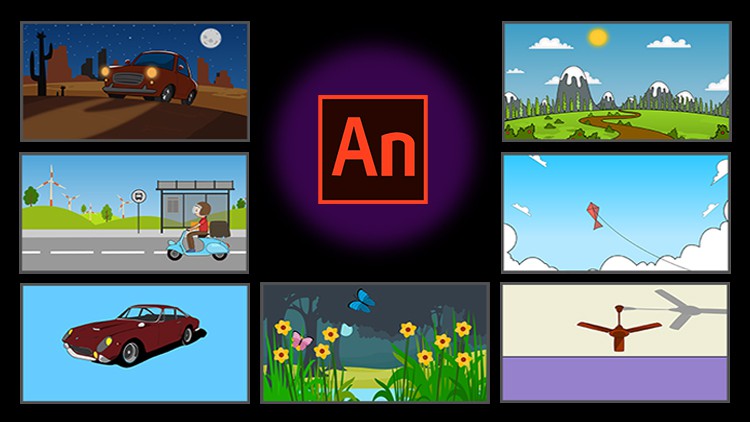
Learn Adobe Animate from Scratch

- Description
- Curriculum
- FAQ
- Reviews
Best course for Beginners!
Learn Animation with Adobe Animate!
If you’re in Animation, Advertising, Graphic Designing. Beginner or Professional and want to learn Adobe Animate from scratch, Really…Quickly…then We’ve got just the course for you! Hi! Art n Animation brings you 25 Fun Videos, We are sharing with you loads of tricks and techniques in Adobe Animates used by professional animators.
Best course to kickstart your career in 2D Digital Animation field. All videos with detailed instructions and study material will help you learn animation quickly and easily!
You will learn Interface, Tools & its properties, Animations using Masking & Add Motion guide technique, Keyframes, Tween Animations, Vector files and animating them, advance animations like Parallax Effect, Camera Animation, Background Vector & Rigging, Understanding Bone Tool and so much more STEP…BY…STEP! All you need is Adobe Animate and you’re ready to go pro in no time!
Feel free to ask us which topic you want to learn here…we will upload bonus videos for same.
If you take this course, you will get…
– Professional Instructors.
– 3+ hours of step-by-step detailed visual instruction.
– 20+ detailed lectures.
– Expert tricks and techniques.
– FREE Background & Vector Files.
– Lifetime Access Its going to be fun! See you in the course.
– 30 Days Moneyback Guarantee.
To know more write us at [email protected]
-
2
 Tutorial _01- Introduction and creating a new document – opening and creating a
This tutorial shows us how we can open a new document or how we can create a new document and save it with a name that we want to give it.
-
3
Tutorial_02 - Managing Workspaces – Creating and Managing a layout for your work
In this tutorial we learn about our workspace in Adobe Animate, what the various tabs are and how we can manage and even customize our workspace for it to be most convenient for us to use.
-
4
Tutorial _03 – Tools and Properties Part 01
This tutorial is the first of four that introduces and explains the tools and also gives us a brief about how to and what to use them for.
-
5
Tools and Properties Part-2
This tutorial is the second of four that introduces and explains the tools and also gives us a brief about how to and what to use them for.
-
6
Tools and Properties Part-3
This tutorial is the third of four that introduces and explains the tools and also gives us a brief about how to and what to use them for.
-
7
Tools and Properties Part-4
This tutorial is the last of four that introduces and explains the tools and also gives us a brief about how to and what to use them for.
-
8
Getting to know the Timeline
This tutorial shows us what the timeline is, how we can use it when animating. For example creating key frames, controlling how long to expose which drawing and so on.
-
9
Properties Tab
In this tutorial we cover the properties tab and its use just like the timeline tutorial.
-
10
Types of Symbols – Creating and Working with Symbols and its types.
In this tutorial we learn about symbols, how they are important for animation in Adobe Animate and how we can create, use and manage them.
-
11
Types of Tweens – Moving the Symbols, Shape, Motion and Classic tween
This tutorial shows us how we can move symbols around the stage area, and how we can use motion tween and classic tween for our animation
-
12
Introduction to Masking Technique
-
13
Mask Technique - Animate Rotating Ball
This tutorial is the second in the series of mask tutorials that shows a working example and one of the many things we can do with the mask tool. We create the illusion of a rotating ball using the mask tool in this tutorial.
-
14
Mask Technique - Animated Water Effect on Image
This is the third tutorial in the mask series. In this tutorial we learn to create another wonderful example of water animation using the mask tool
-
15
Mask Technique - Animate Car Shine Effect
The final tutorial in the mask series. This tutorial shows us how we can use the mask tool in another way.
-
16
Motion Guides – Learn to set a path for an object to move
This tutorial shows us how to use motion guides in our animation. This is a very important tool when we want certain objects to move along a pre-decided path.
-
17
Camera Animation
This tutorial introduces us to the camera tool which is a new tool in the Flash program that preceded Animate CC. This tool includes several features of the camera and makes it easier to us to work when we want certain in our videos that are camera oriented.
-
18
Background Vector
This tutorial shows us the process of tracing our animation assets, converting them into vector format and then rigging them so that they are ready to be animated.
-
19
Animating Day to Night Scene
This tutorial shows us the use of a rigged background and how to animate it using what we’ve learnt so far in the course
-
20
Parallax Effect
We learn to create a parallax effect in this tutorial. We pan different layers of the background at different speeds to get a very realistic and convincing effect of real-time motion.
-
21
Boy on Scooter Animation
In this tutorial we see how we can animate a scooter that seems to be moving on the road without actually moving it forward using loops and background pans
-
22
Ceiling Fan Animation
In this tutorial we see how to animate a ceiling fan using the tools we’ve learnt so far.
-
23
Butterfly Animation using Motion Guide
This tutorial shows us how to use the motion guide to animate butterflies.
-
24
Working with Bone Tool
In this tutorial we see how to use the bone tool to create an armature to control the arm of the character.
-
25
Flying Kite Animation
This tutorial shows us how to use the motion tween and motion tween options. We also learn how to use key frames to improve our animation.