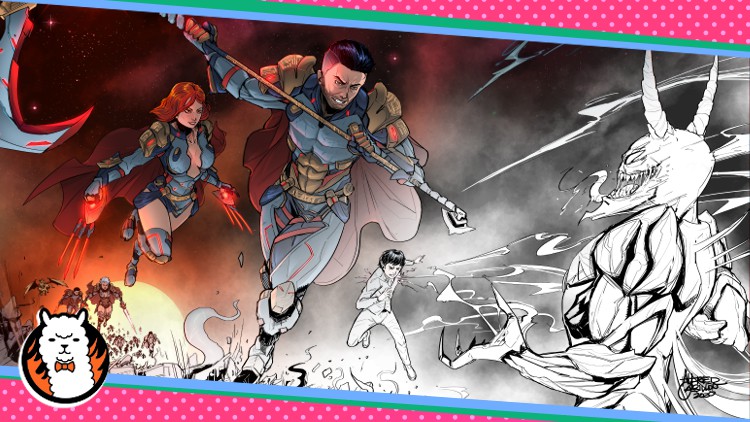
Comic Book Creation Masterclass: Draw Amazing Superheroes!

- Description
- Curriculum
- FAQ
- Reviews
Hello true believers and super fans! Welcome to my Comic Book Creation Masterclass.
My name is Alfred. I’m a professional comic book artist. And my artworks have been featured by DC comics,Dark Wave Comics, Artix, Adventure Quest World, Long Beach Comicon, LA Comicon.
This is a COMPLETE comic book creation course – I will take you through my entire process from how I conceptualize ideas, initial drawing & sketching, finalize drawings, coloring, and setting up the comic layout which involves paneling, framing, & scripting.
Whatever skill level you are at (beginner, intermediate, advanced), this course is perfect for you! I even use a FREE software so you don’t need to buy any expensive software. I even use a FREE software called FireAlpaca so you don’t need to buy any expensive software.
By the end of this course, you will be armed with the skills to create your own comic book art from scratch. You will also be equipped with the knowledge to become a professional comic book artist and make money with your art…if that’s what you want!
-
2
 Paper Size Settings
In this lecture I will discuss the ideal paper size for your comic book creation project.
I have also added a short cut keys sheet in the resources in this lecture.
-
3
Perspective and Ruler Function
In this lecture I will walk you through the important perspective rulers and their function.
-
4
Essential Brushes
In this lecture I will discuss the essential brushes that I mainly use. The pencil brush, pen brush, marker brush, Airbrush, and watercolor brush.
-
5
Lasso Tool and Magic Wand Tool
In this lecture I will show you how to use the Lasso Tool and the Magic Wand.
-
6
Blur Effects
In this lecture I will discuss about the blur effects that I use. These are the Gaussian blur, Motion Blur, and Lens Blur.
-
7
Bucket Tool
In this lecture I will discuss about the bucket tool and the fill function.
-
8
Reference Window and Color Picker Tool
In this lecture I will discuss about the reference window and the corresponding shortcut keys.
-
9
Undo Function
In this lecture I will briefly discuss the undo function of FireAlpaca.
-
10
Drag, Zoom in and Zoom out Function.mp4
In this lecture I will discuss the Drag function. I will also discuss the Zoom in and Zoom out functions.
-
11
Layers and its Functions
In this lecture I will walk you through some important layer blending functions.
-
12
Text Option Function
In this lecture I will show you how to use the text option function.
-
13
Filters Function
In this lecture I will discuss about levels, hue, and tone curve. They are the Filters function in the software.
-
14
Figure Drawing and Basic Anatomy
In this lecture I will discuss about proper drawing anatomy.
-
15
Scripting and Panelling
In this lecture I will walk you through the process of scripting and panelling of your comic book page.
-
16
Adding Text to Speech Bubbles
In this lecture I will show you how to add a speech bubble and how to add text to it.
-
17
Rough Sketch of Bust Art - Part 1
In this lecture I will show you how to start your drawing and rough sketching.
-
18
Inking of Bust Art
In this lecture I will show you how to start inking your comic character.
-
19
Applying Base Colors and Establishing Shadows
In this lecture I will show you how to apply base colors and establish shadows to your artwork.
-
20
Shadows and Highlights
In this lecture I will discuss more about applying shadows and highlighting.
-
21
Hatchings and Finishing Touches
In this lecture I will discuss about applying hatchings to your artwork.
-
22
Background and Glow Effects
In this lecture I will show you how to design and color the background of your comic book character. I also demonstrate how to add glow effects. Further, I also discussed briefly some basic coloring techniques.

-
26
Comic Book Character Drawing Part 1
In this lecture I will show you how to start drawing your comic book character.
-
27
Comic Book Character Drawing Part 2
Continuation of rough sketches for your comic book character.
-
28
Comic Book Character Drawing Part 3
Finalizing the rough sketches of your comic book character.
-
29
Establishing Inks part 1
In this lecture I will show you how to inking your artwork.
-
30
Establishing Inks part 2
Continuation of inking your artwork.
-
31
Shadows and Hatchings
In this lecture I will show you how to apply shadows and hatching properly.
-
32
Detailings
In this lecture I will show you how add more details to your comic book character.
-
33
Finishing Touches
In this lecture I will show you how to add finishing touches to your comic character drawings.
-
34
Final Output
In this lecture I will discuss how to finalize the inking process.
-
35
Quick Coloring Review
In this lecture I will discuss briefly about the basics of coloring.