Build Your Own FREE AI Art Generator for Unlimited Images

- Description
- Curriculum
- FAQ
- Reviews
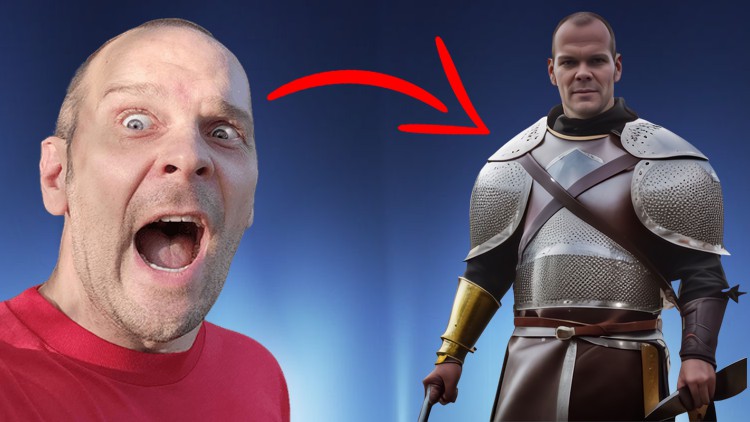
This comprehensive course is designed to provide students with the skills and knowledge needed to build a powerful and free AI art generator for endless images. We’ll begin by exploring all the essential aspects of machine learning and AI art, including technology, tools, syntax, prompting, and more. Next, we’ll dive deeper into the process of building an AI Art Generator from scratch using neural networks and custom solutions; discovering excellent tools available while comparing paid and free options. After successful completion of these steps, you will learn how to import your own selfie images into your AI Art Generator for limitless visuals!
Throughout this course you will be guided every step of the way towards crafting your own AI Art Generator with ease – one that does not require payment fees or purchase of third-party software. All the while, you can trust in expert instruction on techniques that let you create amazing digital artwork from scratch. By the end of this course you should have a comprehensive understanding on how to construct your own powerful image generator for unlimited images – with absolutely no cost or hassle! So enroll now and take the first step on your journey towards building an incredible AI art experience.
-
2
 What Is AI Art?
AI art is a growing field of art created using artificial intelligence and machine learning tools. In this lecture, we will explore the concept of AI art and discuss its implications for the future of creativity. We will cover topics such as understanding the differences between AI-generated art, traditional artwork, and even artwork created with generative adversarial networks (GAN's). Along the way, we will look at some examples of AI generated artwork in various mediums to understand how it works and why it is so fascinating. At the end of this talk, you should have a better understanding of what makes AI art unique and be able to articulate why it has become so popular in recent years.
-
3
Why Would I Use AI Art?
In this lecture, we will explore the benefits of using AI art and discuss why it can be a powerful tool for expressing creativity. We will examine the applications of AI art in various fields, such as marketing, entertainment, and fine art, and consider how it can help to add a new dimension or style to artwork. We will also look at some of the different techniques used to generate AI generated artwork, such as generative models, neural networks and GANs. Finally, we will explore some examples of AI generated artwork and discuss possible challenges or considerations when incorporating them into your own projects. By the end of this lecture, you should have a better understanding of what advantages AI art offers and be able to identify potential use cases for your own creative endeavors.
-
4
The History Of Artificial Intelligence
In this lecture, we will explore the history of artificial intelligence (AI). We’ll trace its development from early days, when AI was first conceptualized, to modern advancements in machine learning and computer vision. We'll look at important milestones such as the Turing test, as well as breakthroughs made by researchers. By the end of this session, you should have an appreciation for the journey that AI has taken so far and an understanding of why it is so important today.
-
5
A Brief History Of AI Art
In this lecture, we will explore the history and evolution of AI art. We’ll take a look at early experiments in generative art and discuss some of the first use cases for machine-generated artwork. We’ll also examine some of the most influential breakthroughs in AI art over the years, including GANs and creative neural networks. Finally, we’ll discuss how AI art is being used today and consider potential implications for its future application. By the end of this session, you should have a better understanding of why AI art is so important and be able to identify potential use cases for your own projects.
-
6
How AI Art Can Save You A Lot Of Time, Money, Or Work
In this lecture, we will explore how AI art can save you a lot of time and money. We’ll discuss why hiring artists and designers can be costly, as well as the importance of creating high-quality visuals to boost engagement. We’ll also examine the various ways that AI art can help save time by automating tedious design tasks or providing creative solutions when time is limited. Finally, we’ll consider practical applications for AI art in your own projects and look at use cases such as generative design and personalized artwork. By the end of this session, you should have a better understanding of how to use AI art to streamline your processes and optimize both time and cost efficiency.
-
7
Intro: What are prompts and why are they useful in AI Art creation?
In this lecture, we will explore what AI art prompts are and why they can be so useful. We’ll examine how artificial intelligence can be used to generate creative ideas and discuss the different types of AI prompts. We’ll also look at how AI art prompts can help inspire creativity in a team or individual setting and consider potential applications for storytelling or interactive media. By the end of this session, you should have a better understanding of how AI art prompts can benefit your workflows and develop more compelling visuals.
-
8
The Anatomy of a Prompt
In this lecture, we will explore the anatomy of an AI art prompt. We'll discuss what they are, how they're created, and the various elements that contribute to their effectiveness and aesthetic appeal. We'll examine the importance of context when crafting a prompt, exploring topics such as audience interests, creative concepts, and semiotics. We’ll look at how to take simple elements like color palettes and font styles to create meaningful visuals. Finally, we’ll consider ways to make prompts more interactive by incorporating user feedback or using natural language processing, as well as other considerations for content optimization. By the end of this session, you should have a better understanding of AI art prompts and be able to craft them for your own projects.
-
9
Prompting Resources
In this lecture, we will explore the variety of AI art prompting resources available to teams or individuals. By the end of this session, you should have a place to turn for additional prompting resources.
-
10
Phraser Prompt Helper
In this lecture, we will explore the Phraser Prompt Helper tool and its capabilities. We’ll look at the various functions it offers, as well as features like natural language processing and custom templates. We’ll discuss how to use the tool to create meaningful art prompts for AI projects with ease. Finally, we'll consider ways to customize your prompts using parameters such as colors, shapes, fonts, and other design elements. By the end of this session, you should have a better understanding of how to leverage Phraser Prompt Helper for your own projects and how to design an effective prompt from scratch.
-
11
Chibi Studio Prompt Helper
In this lecture, we will explore the Chibi Studio Prompt Helper tool and its capabilities. We’ll look at features such as templates, natural language processing, customizable parameters, and design tools. We’ll discuss how to use the tool to create engaging prompts for AI projects quickly and effectively. Finally, we'll consider ways to customize your prompts using parameters such as colors, shapes, and other design elements. By the end of this session, you should have a better understanding of how to leverage Chibi Studio Prompt Helper for your own projects and how to design an effective prompt from scratch.
-
12
Promptomania Prompt Builder
In this lecture, we will explore the Promptomania Prompt Builder tool and its capabilities. We’ll look at features such as natural language processing, customizable parameters, and design tools. We’ll discuss how to use the tool to create detailed prompts for AI projects easily. Finally, we'll consider ways to customize your prompts using parameters such as colors, shapes, and other design elements. By the end of this session, you should have a better understanding of how to leverage Promptomania Prompt Builder for your own projects and how to develop an effective prompt from scratch.
-
13
Intro: Why Search Through Other People's AI Art Creations?
In this lecture, we will explore the ability to search through others’ AI art creations. We’ll look at features such as filtering by design elements and exploring tools used in the artwork. We’ll discuss how to use search functions to find inspiration for new projects or to learn about different techniques used in creating AI artwork. Additionally, we'll consider ways to save your favorite pieces of art for future reference. By the end of this session, you should have a better understanding of why you would search through other people's AI Art and prompts.
-
14
Searching Lexica
In this lecture, we will explore Lexica AI Art Gallery and its features. We’ll discuss how to use Lexica's search functions to find artwork based on design elements, techniques used, or even the artist’s name. Additionally, we'll look at ways to share your artwork with the world through Lexica's worldwide platform. By the end of this session, you should have a better understanding of how to leverage Lexica AI Art Gallery for yourself and your art.
-
15
Hugging Face Community
In this lecture, we will explore the Hugging Face Community AI Art Gallery and its features. We'll discuss how to navigate and evaluate art created by other AI Artists. By the end of this session, you should have a better understanding of how to use Hugging Face Community AI Art Gallery to spark creativity and evaluate methods.
-
16
Searching DeviantArt
In this lecture, we will explore the features of DreamUp Gallery and how to navigate it. Additionally, we'll look at the ways of evaluating artwork for methodical purposes. By the end of this session, you should have a better understanding of how to leverage DreamUp Gallery for yourself and your art.
-
17
Searching Hotpot Gallery
In this lecture, we will take a closer look at the features of Hotpot Gallery and how to survey it for useful methodology and prompting resources. By the end of this session, you should have a better understanding of how Hotpot Gallery can be leveraged to create compelling visual stories through your art.
-
18
CF Spark Community Feed
In this lecture, we will take a closer look at the CF Spark Community Gallery and how to survey it for useful prompting methods. By the end of this session, you should have a better understanding of how to leverage the CF Spark Community Gallery to glean good prompting methods and create powerful visual stories through your art.
-
19
ArtHub.ai
In this lecture, we will take a closer look at Arthub AI Gallery and explore how this artificial intelligence-powered platform can help you curate artwork with ease. We'll cover topics such as how to upload artwork, configure custom portfolios, filter works based on design elements or techniques used, and evaluate artworks for quality control. We'll also discuss the many features that make Arthub AI Gallery perfect for showcasing your work while connecting with other creatives in a vibrant community. By the end of this session, you should have a better understanding of how to leverage Arthub AI Gallery to create compelling visual stories through your art.
-
20
Introduction to Paid Software
In this lecture, we will explore various paid AI art software options available to creatives. We'll look at how these tools can help you create stunning artwork with minimal effort, and how their powerful features provide superior results compared to free alternatives. We'll also talk about the main criteria for selecting the best software for your needs, discuss some of the more popular paid AI art tools out there, and answer any questions about pricing models or other topics related to this emerging technology. By the end of this section, you should have a better understanding of what these tools offer and how to choose one that fits your needs.
-
21
Jasper Art from jasper.ai
In this lecture, we will take a closer look at how Jasper Art can help you create stunning artwork with the help of artificial intelligence. We'll cover topics such as using Jasper Art to automatically generate visual art pieces with custom design elements, how to refine and edit AI-generated works for an even better outcome, leveraging the vast resources that Jasper Art can provide when it comes to creating high-quality digital content. By the end of this session, you should have a better understanding of how to use Jasper Art for creating unique AI artworks that reflect your own creative vision.
-
22
Synthesis Vision
In this lecture, we will take an in-depth look at how to use Synthesys Vision for creating artificial intelligence-driven art. We'll discuss topics such as leveraging the range of features that this powerful AI tool provides, learning how to customize and refine AI-generated artwork with unique design elements, and understanding the fundamentals of working with Synthesys Vision. By the end of this session, you should have a better idea of how to use Synthesys Vision to create artworks that are truly one-of-a-kind.
-
23
DeviantArt - Dreamup
In this lecture, we will explore how to use DeviantArt DreamUp for creating AI-generated art. We'll discuss the basics of using DreamUp and how to get started with the tool. Then, we'll look at how to customize your artwork with elements such as colors, shapes, and symbols, as well as techniques for creating unique textures and color combinations. Finally, we'll go over some tips on navigating DeviantArt's platform so that you can make the most of this powerful art creation tool. By the end of this session, you should understand the fundamentals of working with DeviantArt DreamUp and be ready to start creating AI-powered pieces of art.
-
24
ClosersCopy
In this lecture, we will explore how to use Closers Copy for AI art creation. We'll discuss the fundamentals of setting up and working with Closers Copy, learning how to create unique artworks by customizing elements such as colors, shapes, patterns, and textures. We'll also go over techniques for creating multiple versions of a piece to help you achieve maximum creativity and originality. By the end of this session, you should be familiar with the basics of using Closers Copy as an AI art creation tool and ready to start creating your own works!
-
25
Nichess
In this lecture, we will explore how to use Nichesss for AI art creation. We'll discuss the basics of setting up and working with Nichesss, as well as how to utilize its creative tools like generating random shapes and textures. We'll also cover techniques for customizing colors and adding elements to your artwork, such as gradients and borders. By the end of this session, you should have a solid understanding of the fundamentals of using Nichesss to create unique pieces of artwork.
-
26
Introduction to Free Software
In this lecture, we will explore the basics of creating AI art using free options. We'll go over the different software programs, sources, and tools available to create unique artwork quickly and easily. We'll also discuss techniques for optimizing and customizing your creations and strategies for staying up-to-date with the rapidly changing AI art landscape. By the end of this session, you should have an understanding of the availability of free AI art tools and be ready to start creating your own amazing works!
-
27
Midjourney
In this lecture, we will explore how to use MidJourney for AI art creation. We’ll discuss the basics of setting up and working with the platform, as well as how to utilize its creative tools like object recognition and image manipulation. We’ll also cover techniques for customizing colors and using filters and textures to amplify your artwork. By the end of this session, you should have a solid understanding of the fundamentals of using MidJourney to create unique pieces of artwork.
-
28
Dall-E
In this lecture, we will explore how to use Dall-E 2 for AI art creation. We’ll discuss the basics of setting up and working with the platform, as well as how to utilize its creative tools like deep neural networks and image manipulation. We’ll also cover techniques for customizing color palettes, using creative filters to refine images, and adding style options like textures and frames to your artwork. By the end of this session, you should have a solid understanding of the fundamentals of using Dall-E 2 to create unique pieces of artwork.
-
29
Canva
In this lecture, we will explore how to use Canva for AI art creation. We’ll discuss the basics of setting up and working with the platform, as well as how to utilize its creative tools like image recognition and deep learning technologies. We’ll also cover techniques for customizing colors, applying filters and effects to refine images, and adding frames or text overlays to your artwork. By the end of this session, you should have a solid understanding of the fundamentals of using Canva to create unique pieces of artwork.
-
30
Lensa For Self Images
In this lecture, we will explore how to use Lensa for AI art creation with selfies. We’ll discuss the basics of setting up and working with the platform, as well as how to utilize its creative tools like facial recognition and self-improving algorithms. By the end of this session, you should have a solid understanding of the fundamentals of using Lensa to create unique pieces of artwork with your selfies.
-
31
Stable Diffusion Demo Sites
In this lecture, we will explore how to use three completely free Stable Diffusion demo sites for AI art creation. We'll show the basics of using the tools. By the end of this session, you should have a solid understanding of the fundamentals of using these platforms to create original pieces of artwork.
-
32
Freeway ML
In this lecture, we will explore how to use FreewayML for AI art creation. We’ll discuss the basics of setting up and working with the platform, as well as how to utilize its creative tools such as image processing, texture mapping and generative algorithms. We’ll also cover techniques for customizing the appearance of images, optimizing them with filters and effects and applying prompts to generate a unique style. By the end of this session, you should have a solid understanding of the fundamentals of using FreewayML to create original pieces of artwork.
-
33
Runway ML
In this lecture, we will explore how to use Runway ML to generate AI artwork. We’ll discuss the basics of setting up and working with the platform, as well as how to utilize its creative tools such as image processing. We’ll also cover techniques for customizing the appearance of images, optimizing them with filters and effects and adjusting prompts to achieve the desired output. By the end of this session, you should have a solid understanding of the fundamentals of using Runway ML to create original pieces of artwork.
-
34
And The List Goes On! - Phygital Library
In this lecture, we will explore the range of resources available to help create AI art. We’ll discuss the new advances in image processing, texture mapping and generative algorithms that have made AI art more accessible than ever before. We’ll also touch on open source datasets, online galleries and tutorials which can be used to gain a better understanding of the creative process. By the end of this session, you should have an up-to-date knowledge of all the tools available for creating engaging and innovative pieces of AI artwork.
-
35
Introduction To Creating Your Own AI Image Generator
In this lecture, we will learn how to create our own AI image generator. We’ll cover the basics of setting up and working with popular platforms such as Stable Diffusion, NMKD, and Google Colab. We’ll also discuss techniques for customizing images using filters and effects, optimizing them with prompt adjustments and creating a training dataset to feed into the generator. By the end of this session, you should have gained a solid understanding of the fundamental concepts behind running your own AI art generator.
-
36
NMKD Stable Diffusion GUI
In this lecture, we will explore the techniques behind running NMKD. We’ll discuss the fundamentals of NMKD and how to calculate gradients from a diffusion matrix. By the end of this session, you should have a good understanding of the principles behind NMKD and be able to confidently run the platform for AI Art Creation.
-
37
Stable Diffusion UI
In this lecture, we will learn the basics of running a user interface for stable diffusion algorithms. We’ll cover concepts such as installing and running the UI, and being able to create your graphics. By the end of this session, you should have a good understanding of how to run an effective user interface for the stable diffusion engine.
-
38
InvokeAI
In this lecture, we will explore how to use the InvokeAI user interface for running stable diffusion. We’ll discuss topics such as setting prompts and refining your images. By the end of this session, you should understand how to effectively use the InvokeAI user interface to run any stable diffusion algorithm.
-
39
Stable Diffusion on Google Colab
In this lecture, we will learn how to use the Google Colab platform for running an AI Art Generator. We’ll discuss topics such as creating and setting up a new project, understanding how to run the Colab Notebook, and evaluating performance. By the end of this session, you should have a good understanding of how to use Google Colab to run an AI Art Generator.
-
40
Introduction To Putting Yourself Or Others Into Your AI Artworks
In this section, we will explore how to train an AI Art model with your own selfies. We’ll discuss topics such as preparing data, training a convolutional neural network model checkpoint and prompting the results. We’ll also cover strategies for optimizing the model performance and creating your own unique artwork. By the end of this section, you should be equipped with the skills necessary to create AI Art using your own pictures.
-
41
Gather Self Pics and Resize
In this lecture, we will cover how to gather your own self-portraits and resize them for use in creating AI Art. We’ll discuss topics such as finding the your images, choosing the right file types, and using an easy technique to crop and resize them all at once. By the end of this session, you should have a good understanding of how to prepare your own selfie pics for use in AI Art projects.
-
42
Launching the Software and Training Self Model
In this lecture, we will explore how to create AI Art that looks like you! We’ll discuss topics such as collecting selfies and resizing them, training a convolutional neural network model on your own likeness and visualizing the results. We’ll also cover techniques for customizing the AI Art with your own style and personal preferences. By the end of this session, you should be ready to take your AI Art projects to the next level by creating images that have you in them!
-
43
How To ReUse Your Model
In this lecture, we will cover how to use the AI Art model you have created on an ongoing basis. We'll discuss topics such as finding your checkpoint model, running the same model, and making modifications to improve its performance with new prompts. By the end of this session, you should be able to take advantage of your AI Art models for creating stunning and unique art works over and over again.
-
44
Using Your Self-Model In NMKD GUI Locally
In this lecture, we'll look at how to use the AI model you have trained within local software application NKMD. We will discuss topics such as setting up the model and connecting it to input data sources. By the end of this session, you should be able to confidently deploy your AI models within the local application!
-
45
Introduction to Finishing Your Images
In this section, we'll explore ways you can use different techniques to give your AI images a professional finish. We will discuss topics such as tweaking the images with Inpainting and Outpainting, increasing the size of the image, and cutting out the background. By the end of this session, you should be able to take your images from creation to completion with ease!
-
46
Upscaling Your Artwork With Photoshop
This lecture will teach you how to use Photoshop to take your artwork from low resolution to high resolution. We will discuss topics such as selecting an upscaling algorithm, understanding the risks of upscaling, and assessing the output results. By the end of this session, you should be able to confidently apply Photoshop tools that can dramatically increase the quality of your artwork!
-
47
RECOMMENDED - Upscaling with UpscalePics
In this lecture, we'll explore ways to use an online service to upgrade your artwork from low-resolution to high-resolution. We will discuss topics such as selecting the optimal algorithm, understanding the constraints of online services, and assessing the output results. By the end of this session, you should be able to confidently apply online tools to give your artwork a professional touch!
-
48
Inpainting
This lecture will provide an overview of the process of inpainting. We'll discuss topics such as understanding fill algorithms, exploring interpolation techniques, and keeping image consistency. By the end of this session, you should be able to confidently apply sophisticated inpainting techniques to retouch images with improved details!
-
49
Outpainting
This lecture will cover the fundamentals of outpainting. We'll discuss topics such as understanding how to allocate pixel space, applying a variety of blending techniques, and developing strategies for combining multiple images. By the end of this session, you should be able to confidently repaint and edit existing images with improved resolution!
-
50
Remove Background with Photoshop
This lecture will provide a comprehensive overview of how to use Photoshop for background removal. We'll look at topics like understanding selection tools, creating masks, and manipulating levels. By the end of this session, you should be able to confidently remove backgrounds from images with precision and accuracy!
-
51
Remove Background with Canva
This lecture will provide an in-depth exploration of how to use Canva for background removal. We'll cover topics such as understanding how to remove the background, and exporting the final image. By the end of this session, you should be able to confidently remove backgrounds from images with accuracy and speed!
-
52
Remove Background with Romoval.ai
This lecture will provide a comprehensive overview of how to use removal.ai for background removal. We'll cover topics such as removing the image background, and exporting the final image. By the end of this session, you should be able to confidently remove backgrounds from images with ease!
-
53
Remove Background with Erase.bg
This lecture will provide a comprehensive overview of how to use erase.bg for background removal. We'll cover topics such as understanding how to remove a background, and exporting the final transparent image. By the end of this session, you should be able to efficiently remove backgrounds from images with accuracy!